3.8.5.4 URL-Based Call Control Integration
These features enable URL-based interaction and allow seamless integration with third-party software such as CRM and enterprise systems. The application supports two complementary mechanisms: receiving command URLs for remote call control and sending webhook notifications to forward call events to external services.
These URL commands can also be triggered locally on a Mac using AppleScript. This allows macOS users to start, answer, or end calls directly from small scripts.
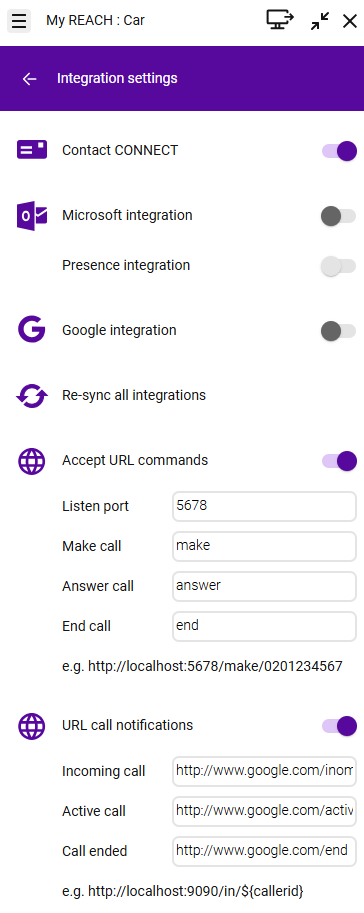
Function | Direction | Purpose |
|---|---|---|
Accept URL Commands | Third-party application (e.g. CRM) Enreach Contact Desktop Client | Allows third-party applications to control call actions via HTTP requests. The URL commands must match the exact format expected by the Enreach Contact Desktop Client. |
URL Call Notifications | Enreach Contact Desktop Client Third-party application (e.g. CRM) | The client automatically informs other applications when calls start, become active, or end. The configured URLs must follow the format required by the receiving third-party application to ensure proper processing. |
This makes it possible to control calls from other applications and to keep systems synchronized automatically.
All applications have to run on the same computer (PC or Mac).
Accept URL Commands
With Accept URL Commands, other systems can control calls in the application by sending simple web requests (URLs).
When this option is enabled, the application opens a local HTTP listener on the specified port and waits for incoming command URLs. These commands can trigger call actions remotely.
Option | Explanation |
|---|---|
Listen Port | The network port the application uses to receive commands. The external system must send requests to this port. |
Make Call | This field defines the command segment used to trigger an outbound call through a URL request. To dial a number, the third-party sends an HTTP request to the listener port, including both the command keyword and the destination phone number. Example: http://localhost:5678/make/020123456 When accessed, this URL causes the application to immediately start dialing 020123456. |
Answer Call | This field defines the command used to accept incoming calls via a URL request. When a call is ringing, the third-party system can trigger this endpoint to instruct the application to answer the call automatically. Example: http://localhost:5678/answer When executed, the application answers the current incoming call. |
End Call | URL path used to end the current call. Example: http://localhost:5678/end |
URL Call Notifications
With URL Call Notifications, the application automatically informs other systems when certain call events occur.
When enabled, the application sends a notification (HTTP request) to a predefined URL. These notifications can include information such as the caller number.
Enreach Contact transmits phone numbers without a leading “+” by default (e.g., 4923147770).
If an international format is required (e.g., +4923147770), the “+” can be added directly in the configured URL, for example:
http://localhost:9090/incoming/+${callerid}
Note: With this approach, the “+” is also added to internal phone numbers.
http://localhost:9090/incoming/+${callerid}
Note: With this approach, the “+” is also added to internal phone numbers.
Option | Explanation |
|---|---|
Incoming Call | Sends a notification when a new call is received. A request is sent to the configured URL Example: http://example.com/incoming/${callerid} or http://localhost:9090/incoming/${callerid} |
Active Call | Sends a notification when a call is answered. Example: http://example.com/active/${callerid} or http://localhost:9090/active/${callerid} |
Call ended | Sends a notification when a call ends. Example: http://example.com/end/${callerid} or http://localhost:9090/end/${callerid} |