12 Connection type
Enreach Contact supports both native mobile phone integration (this must have been ordered for you) and mobile integration via app. Native mobile phone integration allows you to make calls directly via the mobile network without an internet connection. With mobile integration via the app, calls are made directly via the Enreach Contact app.
To avoid the signalling of simultaneous calls on your smartphone via the native mobile phone integration and via the app, we also recommend linking the ordered Enreach SIM card to your device. If you do not link your SIM card to your smartphone, calls are signalled both via the native mobile integration and via the Enreach Contact mobile and desktop apps. You therefore receive three call notifications in parallel. If you link your SIM card, you can switch off your mobile device and only receive calls via Enreach Contact Desktop, e.g. when you are in the office.
When linking the Enreach SIM card, you can then also choose whether you want to receive calls exclusively via the mobile network or exclusively via the app.
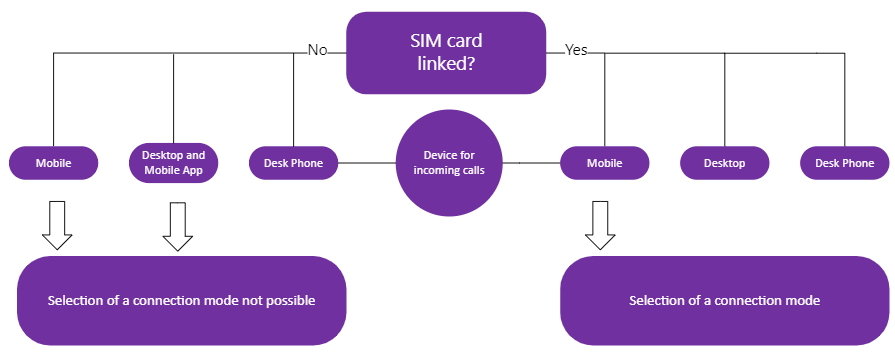
The tables below provide an overview of possible scenarios when selecting the device options and the connection type.
Follow the steps at Set connection type and Link SIM card.
Please note that the SIM card assigned to your Enreach Contact order must be activated on your device.
No SIM card linking
|
Device selection
|
Call behaviour
|
|---|---|
|
Mobile
|
Calls are only signalled via the mobile network.
|
|
Desktop and Mobile App
|
Calls are signalled both on the Enreach Contact mobile app and on the Enreach Contact Desktop app.
|
|
Desk Phone
|
Calls are signalled via the desk phone.
|
|
Mobile + Desktop and Mobile App
|
Calls are signalled both via the mobile network and via the Enreach Contact mobile and desktop apps. You receive three call notifications in parallel.
|
|
Mobile + Desktop and Mobile App + Desk Phone
|
Calls are signalled via the mobile network as well as via the Enreach Contact mobile and desktop apps and on the desk phone. This can lead to unforeseen behaviour and is therefore not recommended.
|
SIM card linking
|
Device
|
Connection type
|
Call behaviour
|
|---|---|---|
|
Mobile
|
App only
|
Calls are only signalled via Enreach Contact Mobile.
|
|
GSM only
|
Calls are only signalled via the mobile network.
|
|
|
App preferred
|
For incoming calls, an attempt is made to deliver the call to the Enreach Contact app for approx. 7 seconds. If you do not have a Wifi connection, the call will be delivered via the mobile network.
The selected connection type is always used for outgoing calls. If you still want to make a call via the mobile network, long tap on next to the extension number in the contact's profile and select GSM call.
|
|
|
GSM preferred
|
For incoming calls, an attempt is made to deliver the call via the mobile network for approx. 7 seconds. If there is no mobile connection, the call is delivered via the Enreach Contact app.
The selected connection type is always used for outgoing calls. If you still want to make a call via the app, long tap on next to the extension in the contact's profile and select App call
|
|
|
Desktop
|
Selection of a connection type not possible
|
Calls are only signalled via Enreach Contact Desktop.
|
|
Desk Phone
|
Selection of a connection type not possible
|
Calls are only signalled via the desk phone.
|
See also chapter 9.1.3 Switch between app and GSM calls.